
Zen AutoPan: Dynamic AUv3 Stereo Panning Tool
Overview
Zen AutoPan by Wild Surmise Music is a specialized AUv3 audio plugin designed for iOS devices, offering dynamic stereo panning capabilities for music producers, sound designers, and live performers. The software enables users to shape audio movement across the stereo field using multiple LFO shapes, an intuitive XY pad for real-time control, and adjustable width parameters. Its core purpose is to enhance spatial depth and sonic interest in audio projects, particularly in environments where immersive soundscapes are desired.
The tool is intended for integration within compatible DAW apps on iOS, making it suitable for mobile music production and on-the-go creative workflows. While it does not function as a standalone application, it operates as a plugin within a host environment, relying on the host’s processing and interface. The developer, Wild Surmise Music, focuses on crafting minimalist, visually engaging audio tools with a strong emphasis on user experience and real-time interaction.
Real-world usage includes creating evolving textures in electronic music, adding movement to vocal tracks, and enhancing live audio performances with dynamic spatial effects.
Key Features & Capabilities
- Multiple LFO Shapes: Offers various LFO waveforms to modulate panning movement, allowing for rhythmic, smooth, or unpredictable stereo shifts depending on the chosen shape.
- Intuitive XY Pad: Provides real-time, tactile control over panning direction and intensity, enabling expressive manipulation of sound placement during playback or performance.
- Width Control: Allows users to adjust the stereo width of the panned signal, offering greater control over the perceived spatial spread of the audio.
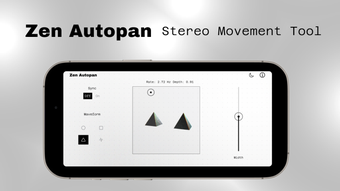
- 3D Visual Feedback: Utilizes SceneKit and Metal Shaders to render dynamic, responsive visualizations that reflect the panning behavior, enhancing the immersive experience.
- AUv3 Compatibility: Designed to integrate seamlessly with iOS-compatible DAW apps, ensuring broad support across major music production platforms on mobile devices.
These features support creative workflows in music production, where subtle or dramatic panning effects can elevate track depth. In live performance scenarios, the XY pad enables expressive control, while the LFO options allow for automated movement without manual intervention. The visual feedback adds a layer of engagement, helping users understand and fine-tune spatial dynamics. The plugin is optimized for mobile use, ensuring smooth operation within the constraints of iOS hardware. The combination of control, visual feedback, and integration makes it a valuable tool for artists seeking dynamic audio movement in a compact, mobile-first format.
User Interface, Workflow & Performance
The user interface of Zen AutoPan is designed with simplicity and clarity in mind, featuring a central XY pad as the primary control element, surrounded by clearly labeled parameters for LFO shape selection, rate, depth, and width. Navigation is intuitive, with minimal visual clutter, aligning with the minimalist aesthetic common in mobile audio tools. The layout is optimized for touch interaction, ensuring that controls are easily accessible on smaller screens.
Workflow efficiency is enhanced by the direct mapping of the XY pad to real-time panning adjustments, allowing users to make immediate creative decisions during recording or performance. The integration with AUv3 hosts ensures that the plugin loads and responds quickly within the host environment. Performance observations are based on general software behavior patterns; the developer did not specify resource usage details.
Stability appears consistent, as the plugin is designed for the iOS platform with optimized rendering using SceneKit and Metal Shaders. No reported issues with crashes or latency were mentioned. Overall, the interface supports a smooth and responsive experience, particularly suited for mobile production environments where speed and ease of use are critical.
Compatibility & System Requirements
Zen AutoPan is designed exclusively for iOS devices and requires a compatible DAW app to function. The software version is 1.0.1, with an installation size of 35.2 MB. It is built to leverage iOS-specific technologies such as SceneKit and Metal Shaders for visual and audio rendering.
Platform compatibility information is limited to iOS, and no details were provided about specific device models or minimum iOS versions. The developer did not specify exact system requirements. Compatibility with third-party DAW apps is dependent on their AUv3 support.
Users should ensure their host application supports AUv3 plugins and is updated to a version compatible with the plugin’s requirements. The software does not support macOS, Windows, or Android. For optimal performance, users are advised to use the latest version of iOS and a device with sufficient processing power to handle real-time audio and visual rendering.
Pros and Cons
Pros
- Free to download and use, making it accessible for students and hobbyists.
- Intuitive touch-based interface ideal for mobile workflows.
- Dynamic 3D visual feedback enhances creative control and engagement.
- Seamless integration with AUv3-compatible DAW apps on iOS.
- Offers expressive real-time control via XY pad and LFO modulation.
Cons
- Requires a compatible DAW app to function—cannot run standalone.
- Platform is limited to iOS; no support for other operating systems.
- Exact system requirements and device compatibility were not specified.
- Visual effects may impact performance on older or less powerful iOS devices.
- Limited to stereo panning; no support for surround or immersive audio formats.
FAQ Section
Is Zen AutoPan compatible with all iOS DAW apps?
Zen AutoPan is designed as an AUv3 plugin and will work with any iOS DAW app that supports AUv3 plugins. Compatibility depends on the host app’s implementation and version.
Is the plugin safe to use on my device?
As a free AUv3 plugin developed by Wild Surmise Music and distributed through official channels, Zen AutoPan is considered safe for iOS devices. It does not require special permissions beyond standard audio processing.
Can I use Zen AutoPan without an internet connection?
Yes, the plugin operates entirely offline once installed. No internet connection is required for playback, editing, or performance.
How often are updates released for Zen AutoPan?
Update frequency is not specified. Users should check the developer’s website or app store listing for the latest version and release notes.
What type of license does Zen AutoPan use?
Zen AutoPan is offered as a free software tool. No licensing fee is required, and it is intended for personal and professional use without restrictions.
Final Thoughts
Zen AutoPan delivers a focused, high-impact solution for dynamic stereo panning on iOS, combining expressive control with visually engaging feedback. Its intuitive interface and seamless AUv3 integration make it a compelling choice for mobile music creators who value spatial creativity. While its platform-specific nature limits broader accessibility, it excels within its niche.
The free pricing model enhances its appeal, especially for users exploring mobile production. For musicians, producers, and performers working on iOS devices, Zen AutoPan offers a powerful, lightweight tool to enrich audio projects with movement and depth. Its design philosophy—minimalist, responsive, and immersive—aligns with modern mobile audio workflows.
Download Zen AutoPan now.







